What Is a Page Builder?
A page builder is a visual tool that allows you to create and customize pages
without writing code. Instead of editing HTML or CSS manually, you build your layout
using drag-and-drop blocks, ready-made components, grids, columns, and widgets.
Page builders help you create professional pages quickly, with full control over structure,
spacing, colors and typography. They are ideal for beginners but extremely powerful
also for advanced creators.
The Advantages of Using a Page Builder
- Visual editing: everything is created by dragging elements on the page.
- Fast development: you can build complete pages in minutes.
- Pre-designed layouts: ready-made blocks speed up the creative process.
- No coding required: perfect for beginners and non-technical users.
- High flexibility: advanced customization without touching the CMS core.
Main Page Builders for WordPress, Joomla and Drupal
Among the most popular page builders used inside traditional CMS platforms, three stand out:
Elementor, SiteOrigin and Divi Builder.
Elementor
Elementor is one of the world’s most popular page builders, especially for WordPress.
It offers a huge library of widgets, animations, templates and design elements.
Its real-time editor makes customization extremely intuitive.
SiteOrigin
SiteOrigin Page Builder is a lightweight solution for those who prefer a simpler,
faster and more performance-oriented workflow. It integrates easily with many free WordPress themes.
Divi
Divi Builder is part of the Elegant Themes ecosystem. It is a powerful visual builder
with a refined interface, advanced controls, and hundreds of professionally designed layouts.
These builders operate within a CMS.
This means you still rely on WordPress, Joomla or Drupal for hosting, content structure,
plugins and updates.
Standalone Page Builders (Wix, Webflow, Framer)
Unlike classic page builders used inside CMSs, there are also standalone site builders
that work completely online without requiring installation.
Examples: Wix, Webflow, Framer.
These platforms provide an all-in-one environment that includes:
- hosting
- design tools
- integrations
- publishing system
- built-in SEO and analytics
They differ from CMS-based builders because you do not manage hosting, backups or database settings.
Everything lives inside the platform’s ecosystem.
Links to explore:
Comparison Table: CMS Page Builders vs Standalone Builders
| Builder Type | Platform | Hosting | Ease of Use | Best For |
|---|---|---|---|---|
| CMS Page Builders | WordPress / Joomla / Drupal | User-managed hosting | ★★★★☆ | Bloggers, marketers, businesses |
| Standalone Builders | Wix / Webflow / Framer | Hosting included | ★★★★★ | Designers, freelancers, fast launches |
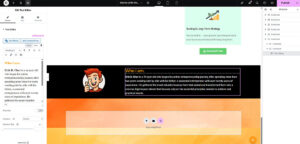
Example Image of Page Builders Layout
FAQ
1. What is the difference between a CMS page builder and a standalone builder?
A CMS page builder works inside WordPress, Joomla or Drupal.
A standalone builder works independently and includes hosting, editor and publishing tools.
2. Are page builders good for SEO?
Yes, but it depends on how they generate code. Modern builders like Elementor and Divi
are optimized, especially if combined with a lightweight theme.
3. Do page builders slow down a website?
Some heavy builders can add extra scripts. Using optimized templates, caching and a good hosting plan
minimizes any slowdown.
4. Can I switch page builder later?
Yes, but you may lose parts of your layout. Switching works best if done early in the project
or by migrating to simpler blocks.